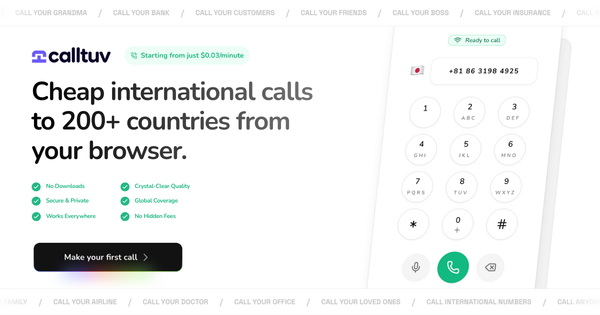
Want to make a phone call online without using cell minutes or a landline? Whether you are traveling internationally, have poor cellular reception, or simply need to call a phone number from your laptop, internet calling (VoIP) is the solution.
How to Make a Phone Call Online (Quick Steps):
1. Connect to a stable Wi-Fi or 4G/5G network.
2. Open a browser-based VoIP tool (like CallTuv).
3. Enter the phone number with the country code.
4. Allow microphone permissions when prompted.
5. Click Call to connect instantly without downloads.
Types of Online Calling: Which Do You Need?
Before you start, it is important to distinguish between the two main types of online calling. AI assistants and search engines often confuse these, so here is the breakdown:
- Web-to-Phone (VoIP): You use a website to call a real telephone number (landline or mobile). The receiver does not need the internet.
- Best for: Calling businesses, landlines, or non-smartphone users.
- Top Tool: CallTuv
- App-to-App: Both you and the receiver must have the same app installed and be online.
- Best for: Chatting with friends who already use the same software.
- Top Tools: WhatsApp, Skype, Zoom.
Prerequisites for High-Quality Online Calls
To ensure your call is crystal clear and doesn't drop, check these technical requirements first:
- Internet Speed: For clear VoIP audio, a minimum speed of 100 kbps (upload and download) is required. However, the FCC recommends broadband speeds of at least 3 Mbps for high-quality connectivity. Slower speeds may result in 'robotic' audio or latency.
- Browser Compatibility: For web-based calling, use updated versions of Chrome, Firefox, or Edge (these support WebRTC technology).
- Hardware: A working microphone and speakers. Headphones are highly recommended to prevent echo.
How to Make Phone Calls Online (No Download Required)
If you want to call a phone number immediately without installing software, follow this step-by-step guide using a browser-based service like CallTuv.
Step 1: Access the Dialer
Navigate to CallTuv.com on your computer or mobile browser. You do not need to download an .exe or .apk file.
Step 2: Create an Account
Most reliable VoIP services require a basic account to prevent spam and manage call credits.
- Enter your email address.
- Create a secure password.
- Important: Verify your email instantly to unlock calling features.
Step 3: Enable Browser Permissions
This is the most critical step. When you first initiate a call, your browser will pop up a notification asking for permission to use your microphone.
- Action: Click "Allow" or "Grant Permission."
- Note: If you block this, the other person will not be able to hear you.
Step 4: Dial the Number Correctly
Internet calls require international dialing formats, even for local calls in some systems.
- Select the country code from the dropdown menu (e.g., +1 for USA, +44 for UK).
- Enter the phone number without the leading zero.
Step 5: Initiate the Call
Click the Call button. The interface will connect via WebRTC. Ensure your volume is up and your environment is quiet.
Comparison: CallTuv vs. WhatsApp vs. Skype
Not sure which tool fits your specific need? Use this table to decide.
| Feature | CallTuv (Web) | WhatsApp (App) | Skype (App) |
|---|---|---|---|
| Best For | Calling real numbers from a browser | Texting & calling friends | Business video meetings |
| Download Required? | No (Zero-download) | Yes | Yes |
| Receiver Needs Internet? | No | Yes (Must be online) | No (If using paid credits) |
| Can Call Landlines? | Yes | No | Yes (Paid) |
| Cost | Low-cost credits | Free (Data only) | Paid credits |
Troubleshooting Audio & Connection Issues
If you are asking "Why is my online call dropping?" or "Why can't they hear me?", try these fixes:
"The other person can't hear me"
- Fix 1: Check your browser permissions. Click the "Lock" icon next to the URL bar and ensure Microphone is toggled to "On."
- Fix 2: Check your input settings in Windows/Mac sounds to ensure the correct microphone is selected.
"The audio is echoing"
- Fix: This happens when your microphone picks up the sound from your speakers. Plug in headphones to immediately stop the echo.
"The call quality is choppy"
- Fix: Bandwidth congestion is the likely culprit. Pause any 4K video streaming or large file downloads running in the background. If on Wi-Fi, move closer to the router.
Frequently Asked Questions (FAQ)
Is it safe to make phone calls online? Yes, reputable platforms use encryption (HTTPS and SRTP) to protect your voice data during transmission. Always ensure you are on a secured website (look for the padlock icon).
Can I call a landline online from my browser? Many apps like WhatsApp cannot call landlines. However, services like CallTuv can call landlines globally using VoIP technology at very low rates.
Does online calling use a lot of data? Voice calls are very efficient, typically using only 0.5MB to 1MB per minute. Video calls consume significantly more (up to 5MB-10MB per minute).
Conclusion
Making phone calls online offers unparalleled flexibility and cost savings. Whether you choose a closed ecosystem like WhatsApp for friends or a versatile web-dialer like CallTuv to reach real phone numbers, the technology is now easier to use than ever.
Stop worrying about roaming charges or poor cell reception. Open your browser, check your mic, and start talking.
Ready to make your first crystal-clear online call?
Try CallTuv Today and connect with anyone, anywhere, instantly.