
How to Call Customers Directly From Zendesk Tickets with CallTuv

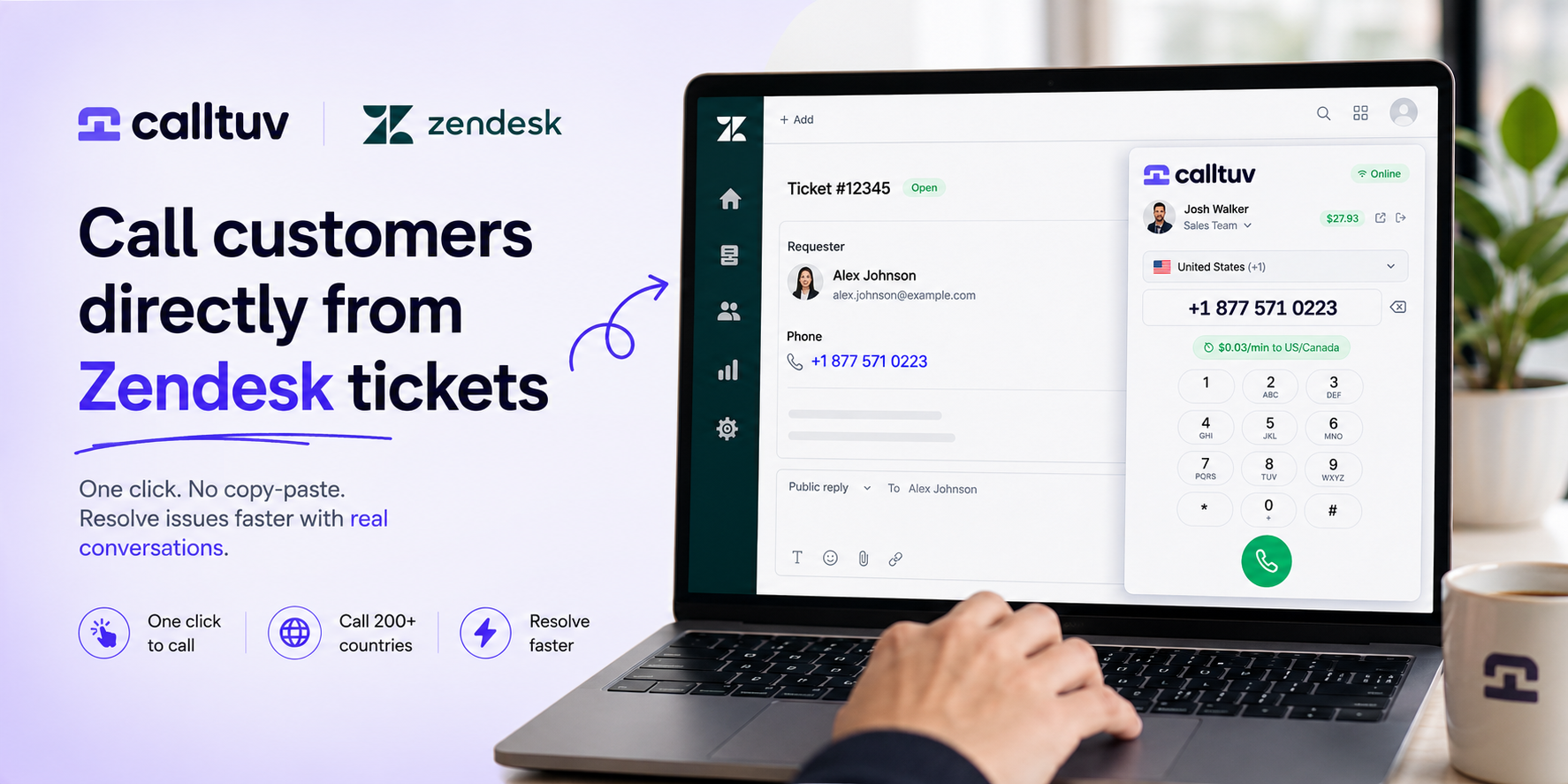
Support teams move faster when everything happens in one place.
Zendesk is where your team already manages customer conversations, ticket history, internal notes, and issue resolution. But when a ticket needs a real phone call, many agents still have to leave Zendesk, copy the customer’s number, open another calling tool, paste the number, check the country code, and manually start the call.
That is a lot of friction for something that should take one click.
With the CallTuv Chrome extension, your team can call customers directly from Zendesk tickets — without copy-paste, desk phones, SIM cards, or complicated phone system setup.
Turn Zendesk tickets into phone calls
Some customer issues are too important, too urgent, or too complex for another email reply.
A customer may be locked out of their account.
A payment may have failed.
A delivery may be delayed.
A booking may need urgent confirmation.
A user may be frustrated and waiting for a real human to help.
In these moments, a phone call can solve in minutes what might otherwise take hours of back-and-forth messages.
CallTuv makes that workflow simple.
When a phone number appears inside a Zendesk ticket, your team can use CallTuv to place a call directly from the browser. The agent stays in the ticket view, keeps the customer context in front of them, and reaches the customer faster.
No switching tools.
No manual dialing.
No unnecessary delays.
Just click, call, and resolve.
Why calling from Zendesk matters
Zendesk is the center of your support workflow. It shows the customer’s request, previous conversations, contact details, ticket status, and internal team notes.
But if calling the customer requires a separate phone system, agents lose momentum.
They need to move between tabs, copy numbers, confirm formatting, and manually log what happened. That slows down support and creates more room for mistakes.
Calling directly from Zendesk helps teams:
- respond faster to urgent tickets
- reduce long email threads
- avoid copy-paste mistakes
- keep agents focused on the customer issue
- make support feel more personal
- resolve tickets faster
- improve the customer experience
For many support teams, the fastest way to close a ticket is not another reply. It is a real conversation.
How CallTuv works with Zendesk
CallTuv is a browser-based international calling platform built for teams that need a simple way to make calls from the tools they already use.
With the CallTuv Chrome extension, your team can detect phone numbers inside Zendesk and call customers directly from the ticket page.
The workflow is simple:
- Install the CallTuv Chrome extension.
- Open a Zendesk ticket.
- Click the customer’s phone number.
- Call the customer from your browser.
That’s it.
Your support agent does not need a desk phone, a SIM card, or a complex call center setup. CallTuv works from the browser, making it easy for remote teams, lean support teams, sales teams, and global customer operations teams to call customers wherever they are.
Built for international customer support
Customer support is no longer local.
Your team may be in one country while your customers, partners, vendors, or users are spread around the world. Sometimes you need to call a mobile number. Sometimes you need to call a landline. Sometimes WhatsApp is not an option.
CallTuv helps teams make international calls to customers in 200+ countries directly from the browser.
That makes it useful for companies that support global customers, including:
- SaaS companies
- travel companies
- marketplaces
- fintech teams
- agencies
- ecommerce businesses
- remote support teams
- customer success teams
- sales and onboarding teams
Instead of relying only on email, chat, or messaging apps, your team gets a simple way to make real phone calls when the situation requires it.
One click. No copy-paste. Faster support.
The biggest benefit of CallTuv for Zendesk is speed.
Support teams do not need more tools that complicate their workflow. They need tools that remove steps.
CallTuv helps agents move from ticket to call instantly.
When the phone number is detected in Zendesk, the agent can start the call directly from the browser. This is especially helpful when dealing with urgent, sensitive, or high-value tickets where waiting for another email reply creates frustration.
Instead of writing:
“Can you please send more details?”
The agent can call, understand the issue, and help the customer immediately.
That is better for the agent.
It is better for the customer.
And it is better for the business.
A lightweight alternative to complex phone systems
Many phone systems are designed for large call centers. They often require long onboarding, contracts, fixed monthly seats, hardware, complex routing rules, or technical setup.
Not every team needs that.
Some teams simply need a reliable way to call customers from Zendesk.
CallTuv is designed to be lightweight and practical. It gives teams browser-based calling, international reach, and a simple click-to-call workflow without turning support operations into a telecom project.
With CallTuv, your team can:
- call directly from Zendesk tickets
- make calls from the browser
- call mobile and landline numbers internationally
- use a shared team balance
- see calling rates before placing calls
- avoid SIM cards and roaming
- work from anywhere
- keep the support workflow simple
For teams that want faster customer conversations without heavy phone system complexity, CallTuv is a clean and flexible option.
Example: resolving a support ticket faster
Imagine a customer opens a Zendesk ticket because they cannot complete a payment.
The agent can reply by email and wait.
Then the customer answers with partial information.
The agent asks another question.
The customer replies later.
The issue takes hours to resolve.
Now imagine the same ticket with CallTuv.
The agent opens the Zendesk ticket, sees the customer’s phone number, clicks to call, and speaks with the customer directly. In a few minutes, the agent understands the issue, confirms the details, and guides the customer through the next step.
The ticket is resolved faster.
The customer feels heard.
The support experience becomes human again.
When should your team call instead of email?
Not every ticket needs a phone call. But some tickets are clearly better handled by voice.
CallTuv is especially useful when:
- the issue is urgent
- the customer is frustrated
- the explanation is complex
- the customer has not replied by email
- the ticket involves payment or account access
- the customer is high-value
- the issue requires real-time guidance
- a quick conversation can prevent churn
A phone call is not just another support channel. Used at the right moment, it can be the fastest path to resolution.
Make Zendesk support more human
Support teams spend a lot of time trying to automate, organize, and optimize customer conversations.
That matters.
But sometimes the best support experience is still simple: a real person calling another real person and helping them solve a problem.
CallTuv brings that human layer into Zendesk.
It helps your team move from ticket to conversation, from waiting to helping, and from back-and-forth messages to real resolution.
Start calling customers from Zendesk
If your team uses Zendesk and needs an easier way to call customers, CallTuv makes the workflow simple.
Install the CallTuv Chrome extension, open a Zendesk ticket, and call customers directly from your browser.
No copy-paste.
No desk phone.
No complex setup.
Just one click to call.
CallTuv helps your team resolve Zendesk tickets faster with real phone conversations.