Available on Chrome Web Store
Click-to-Call on Any Webpage Worldwide
Instantly turn phone numbers on websites, emails, and CRMs into clickable links. Dial faster and boost your productivity.











Free to install. 5-star rating on Chrome Web Store.
Why use the Click to Call Extension?
Streamline your calling workflow and never misdial a number again.
One-Click Dialing
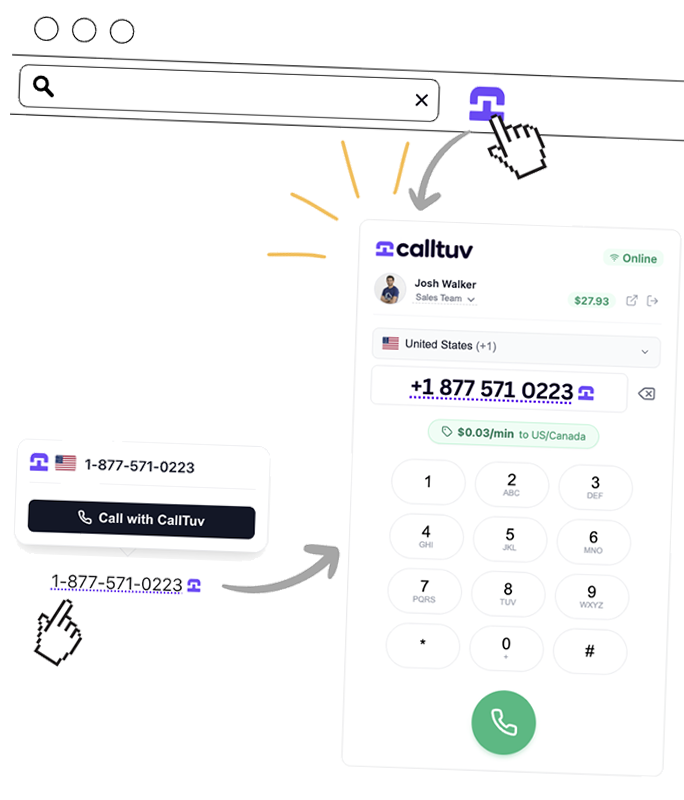
Stop copy-pasting numbers. Just click any phone number you see on the web to start a call instantly.
Works Everywhere
Compatible with all your favorite tools: Salesforce, HubSpot, Gmail, Outlook, and millions of other sites.
Instant Detection
Automatically identifies valid phone numbers on the page and highlights them for easy access.
Ready in Seconds
Start making calls directly from your browser in three easy steps. No complex configuration required.
Add to Chrome
Install the extension from the Chrome Web Store in just one click.
Sign in
Sign in with your CallTuv account (or create one) to sync your credits and settings.
Start Dialing
Browse any site and click on highlighted numbers to make instant calls.

Works With Your Favorite Tools
Boost productivity by connecting CallTuv with the platforms you use every day. Our extension automatically detects numbers in your CRM, helpdesk, and email software, turning them into instant click-to-call links.
Ready to transform your browser into a phone?
Join users from all over the world who use our extension to save hours of manual dialing every week.
Set up in 30 seconds
No configuration needed. Just install and go.
Secure & Lightweight
Minimal impact on browser performance.
Compatible globally
Supports international numbers across 200+ countries.
Frequently asked questions
How does the extension work?
The CallTuv Chrome Extension automatically scans the webpages you visit for phone numbers. It highlights them and makes them clickable, so you can start a call immediately using the CallTuv dialer.
Does it work with my CRM?
Yes! It works on any website, including Salesforce, HubSpot, Zoho, and other web-based CRMs. No complicated integration required.
Is the extension free?
The extension is free to download and install. You only pay for the calls you make using your CallTuv credits.
Can I turn it off for specific sites?
Yes, you can easily toggle the detection on or off from the extension settings if you prefer not to see highlighted numbers on certain pages.
Does it support browsers like Microsoft Edge or Brave?
Yes, since Microsoft Edge, Brave, and Opera are built on Chromium, you can install and use the CallTuv extension from the Chrome Web Store on those browsers as well.
What permissions does the extension need?
The extension requires permission to identify phone numbers on webpages and storage permission to keep you logged in. We do not track your browsing history or access sensitive data like passwords.
Do I need to keep the CallTuv website open?
No, once you are logged into the extension, you can place calls from any tab without needing to have the CallTuv dashboard open in the background.
Do I need special hardware to make calls?
You only need a working microphone (built-in or external) and a stable internet connection. The browser will ask for microphone permission when you place your first call.
Can I see my call history in the extension?
Yes! The extension features a recent calls list, allowing you to quickly view your history and redial any number with a single click.
Related solutions
Add click-to-call to the rest of your calling stack.