Published in Business calling
How to Test an AI Voice Agent on a Real Phone Call (Checklist)
Web previews and simulators skip the phone network. A practical checklist for testing your AI voice agent on real calls: greeting, delay, interruptions, keypad menus, caller ID, callers from abroad and recordings.

By Yosi Dahan7 min read
On this page · 10 sections
- 1Why a web preview isn't enough
- 2The real-call testing checklist
- 3Testing keypad menus and PINs
- 4Record every test call
- 5Test with the caller ID you want the agent to see
- 6Test callers from other countries
- 7Testing as a team
- 8What about agents that call out?
- 9A simple routine before every release
- 10Frequently asked questions
To test an AI voice agent properly, call it on a real phone line, the way your customers will. Simulators and web previews are great for checking the script, but they skip the one thing every real caller goes through: the phone network. That's where the trouble is. Key presses go missing. Audio gets squeezed. Caller ID shows up wrong, and calls from abroad behave differently.
This guide is a practical checklist for testing a voice agent before it goes live: what to check, how to run each test on a real call, and how to keep a record of every call so you can go back to the one where the agent got it wrong.
Why a web preview isn't enough
Most voice agent platforms let you talk to your agent from a button in the dashboard. Use it. It's quick. But that conversation runs from your browser straight to the agent and never touches a phone line.
Your customers don't call from your dashboard. Ever. They dial a number from a mobile in a car, a landline in an office, or a SIM in another country, and the call crosses one or more phone carriers before it reaches your agent. Along the way the audio is converted to a phone codec. The classic one, ITU-T G.711, samples the voice 8,000 times a second, which is far less detail than a browser microphone sends. Accents, quiet speakers and background noise all get harder to understand. Much harder.
Automated testing tools that simulate thousands of callers are useful too, especially for regression tests after every prompt change, when nobody wants to sit through the same fifty calls by hand and a machine will happily dial them overnight while the team sleeps. They don't replace a person. Someone still has to ring the number, hear the greeting and press 1.
The real-call testing checklist
| What to test | How to test it on a call | What good looks like |
|---|---|---|
| Answer and greeting | Call the number and time how long until the agent speaks | It picks up fast and the first words aren't clipped |
| Response delay | Ask a simple question and count the silence | Short enough that you don't wonder if the line dropped |
| Interruptions | Talk over the agent mid-sentence | It stops, listens and answers what you said |
| Keypad menus | Press 1, 2 or 3 at every menu | Every branch is reachable by key press |
| Digits and PINs | Type an account number and finish with # | It reads back the right digits |
| Accents and noise | Have different people call, from a quiet room and a noisy one | It still understands names, numbers and dates |
| Caller ID | Call from a number the agent should recognise | It greets known callers the way you designed |
| Callers from abroad | Call the agent's number from another country, or an agent abroad | Same behaviour, same audio quality |
| Transfers and hand-offs | Ask for a human, a booking or a callback | The transfer connects, or the agent says clearly what happens next |
| Endings | Say goodbye, go silent, or hang up mid-sentence | It ends politely and logs the call correctly |
Run the whole list on staging before launch. Then run it again after any change to the prompt, the voice or the speech settings, because a tweak that looks harmless in the dashboard, a slightly longer system prompt or a different voice model, can add half a second to every reply or quietly stop the agent listening for a key press it used to catch. Small changes break things.
Testing keypad menus and PINs
"Press 1 for bookings" is still the backbone of a lot of phone agents. It's also where things break. A real phone sends key presses through the carrier, and your agent has to pick them up from there.
So test every branch. On a real keypad. Walk each menu the way a customer would, including the wrong key, no key at all, and a key pressed while the agent is still talking. For flows that collect digits, type a full account number or PIN and finish with #, then check the agent's logs to see what it actually received.
On a CallTuv call you open the keypad once the call connects. The keys you press show on screen, so you can match them line by line against your agent's logs.
Record every test call
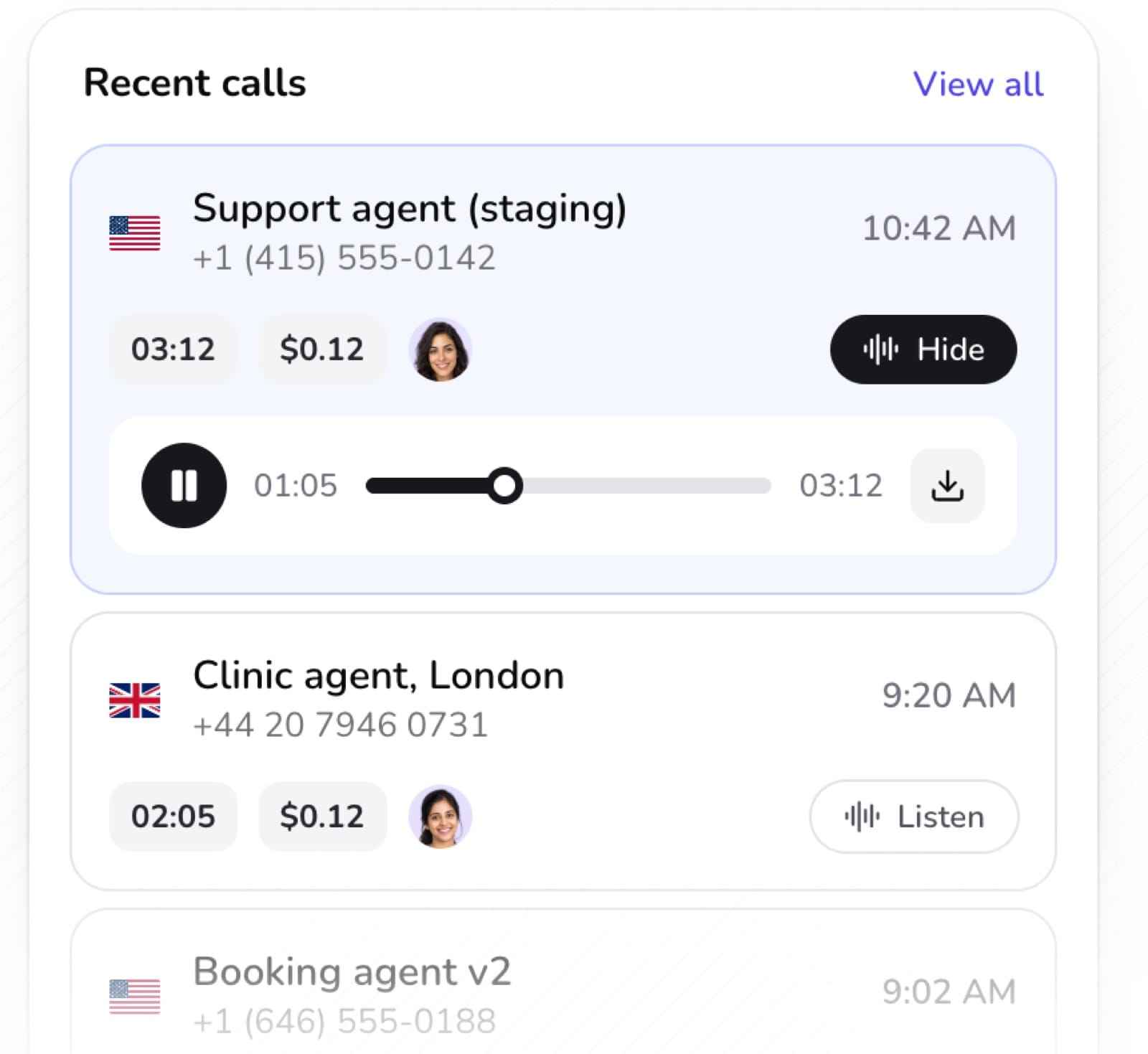
Your agent's platform logs its side of the call. That's half. A recording of what the caller heard is the other half, and it's the half you need when a teammate says "it sounded robotic" or "it cut me off". Listen back to the exact moment. Memory lies.
With CallTuv, switch REC on before you dial. After the call, play it in the browser or download the MP3, and every test stays in your call history with its length and cost. Recording is free.
One thing to plan for: when recording is on, the side you call hears a short automatic message saying the call is being recorded, as soon as it answers and before you're connected. Your agent will hear that message too. Usually that's harmless. It's even a useful check. For a test where the agent's first words matter, leave REC off.
Test with the caller ID you want the agent to see
Many agents care who's calling. They look up the caller in a CRM, greet a returning customer by name, or route a known number to a different flow. So the caller ID has to stay the same.
By default, CallTuv calls show one of its shared numbers. You can verify a number you already own and show that instead, or rent a US number for $5.95 a month so your agent sees the same caller on every test. That makes it easy to save the number in your CRM as a test customer and check the returning-caller flow on every run.
Test callers from other countries
Building for other countries? Test those lines from the outside, ideally from the same kind of phone and the same place your customers will call from, since a clinic agent in London that sounds perfect to a developer in Austin can still trip over a Glaswegian accent on a mobile. A UK agent should be tested on a UK number, a Mexican one on a Mexican number, in the languages and accents callers there will use.
CallTuv calls 232 destinations, and the dialer shows the rate for the number before you call. A few common ones, from the live rate card, checked 19 November 2026:
| Agent's number in | Landline | Mobile |
|---|---|---|
| United States or Canada | $0.03/min | $0.03/min |
| United Kingdom | $0.04/min | $0.07/min |
| Germany | $0.06/min | $0.09/min |
| Mexico | $0.04/min | $0.10/min |
| Australia | $0.07/min | $0.16/min |
Calls round up to the whole minute. A call that never connects costs nothing. So a failed test is free. A three-minute test call to a US agent costs $0.09.
Testing as a team
Different voices find different bugs. Your agent might understand you perfectly and stumble on a colleague with a stronger accent, a softer voice or a habit of interrupting. So get several people calling, from different rooms, phones and countries if you can manage it, and give each of them the same short script so that when one of them hits a problem you can tell whether it was the agent, the line or simply the way that person said a date.
On CallTuv each person runs one call at a time, and the whole team draws on one shared balance with no per-seat fee, which means three testers sitting in three different cities can each be on a call to a different agent at the same moment, all paid from the same credit. The team owner can play back every recording, which makes it easy to review a round of tests together.
What about agents that call out?
If your agent makes outbound calls, for reminders, follow-ups or sales, the test runs the other way: have the agent call a phone you own and listen as the customer. CallTuv makes outgoing calls only and can't receive them, so use your own mobile or desk phone for those tests. The checklist still applies.
A simple routine before every release
- Script the calls. Ten is plenty. Include the happy path, each menu branch, a PIN entry, an interruption, a request for a human, and a confused caller.
- Call staging on a real line, with REC on for most calls and off for the greeting test.
- Split the list across the team so you hear several voices and accents.
- Note the call time of every failure, then open its recording next to your agent's logs.
- Fix, then rerun the same calls. Keep the old recordings so you can hear the difference.
Ready to try it? Call your AI voice agent on a real phone line from your browser, from $0.03 a minute, with no subscription.
Frequently asked questions
How do I test an AI voice agent?
Call its phone number from a real phone line and work through a checklist: greeting, response delay, interruptions, keypad menus, digits, accents, caller ID, transfers and endings. Record the calls so you can compare them with the agent's logs.
Why not just test in the platform's web preview?
The preview connects your browser straight to the agent and skips the phone network. Real callers come through phone carriers, where audio is narrower and key presses travel differently, so some problems only show up on a real call.
Can CallTuv call an agent built on Vapi, Retell AI, ElevenLabs or another platform?
Yes. CallTuv calls phone numbers, so it reaches any voice agent connected to one, whichever platform runs it. Type the agent's number with its country code and press call.
How much does a test call cost?
The per-minute rate of the number you call, from $0.03 a minute for US and Canadian numbers. Minutes round up, calls that never connect are free, and there's no subscription.
Will my agent hear anything extra if I record the call?
Yes. With recording on, the side you call hears a short message that the call is being recorded as soon as it answers. Leave recording off when that would get in the way of the test.
Can I test the agent's keypad menus?
Yes. Open the keypad once the call connects and press keys the way a caller would, including digits finished with #. The keys you send show on screen.
Can my outbound agent call me on CallTuv?
No. CallTuv makes outgoing calls only, so test outbound agents by having them call a phone you own.

Make the call from your browser
Reach landlines and mobiles in 200+ countries. Pay as you go and see the rate before you dial.
Open the web dialerOr call from your phone