Published in Business calling
Callback Widget: Get Leads From Your Website and Call Them Back, Anywhere
A free callback widget lets visitors leave their number and ask you to call. How to add one, pull in leads from Zapier, Make and your forms, and call people back across time zones.

By Yosi Dahan9 min read

On this page · 8 sections
- 1Why a callback beats a contact form
- 2How the CallTuv callback widget works
- 3Add it to your website in about ten minutes
- 4Leads from your other forms land in the same list
- 5Calling international leads back without the guesswork
- 6Working the list as a team
- 7Five habits that get more callbacks answered
- 8Frequently asked questions
A callback widget is a small button on your website that lets a visitor leave their phone number and ask you to call them. You get the request, you call them back, and the conversation starts while they're still interested. With CallTuv the widget is free, the requests land in one list with the time where each person is, and you call them back from your browser at the normal rate for their number, from $0.03 a minute.
That last part matters more than it sounds if your customers aren't all in your country, because a lead in London, Lisbon or Sydney is worth exactly as much as one down the road, and yet most phone setups make the overseas one the awkward call: the expensive rate, the unknown time zone, the number you're not sure how to dial. It shouldn't be. Not anymore.
This guide covers what a callback widget does, how to add one to your site in about ten minutes, how to pull in leads from the forms and tools you already use, and how to call people back across time zones without waking anyone up.
Why a callback beats a contact form
A contact form puts the next step on you, and an email reply puts it back on them, and then the two of you trade messages across a day or two while the person who was ready to buy on Tuesday afternoon cools off, compares three other companies and, quite often, picks one of them. Days pass. Deals don't wait.
Researchers who wrote up a large audit of how companies answer web leads in Harvard Business Review put it bluntly: "most companies are not responding nearly fast enough." That was 2011. Plenty of inboxes haven't changed.
A callback request is different. The visitor has told you they want to talk. They've handed you the one thing you need to do it. And a phone call gets an answer in minutes, which is about how long their interest lasts.
Some people just prefer talking. Buying a service, booking a trip, asking about a property abroad: these are things people want to talk through with a human, and typing questions into a box isn't that.
How the CallTuv callback widget works
A round button sits in a corner of every page. A visitor clicks it, a short form opens, they type their number and press send. That's all they do. No app, no account.
On your side, here's what happens next:
- The request appears at the top of your Leads list, under Business in the CallTuv dashboard.
- The team owner gets an email with the person's number, their message, the time where they are, the page they were on, and a Call now button.
- Anyone on your team presses Call. The dialer opens in the browser with their number ready.
- After an answered call of at least 15 seconds, the request marks itself as called. Nobody has to update a spreadsheet.
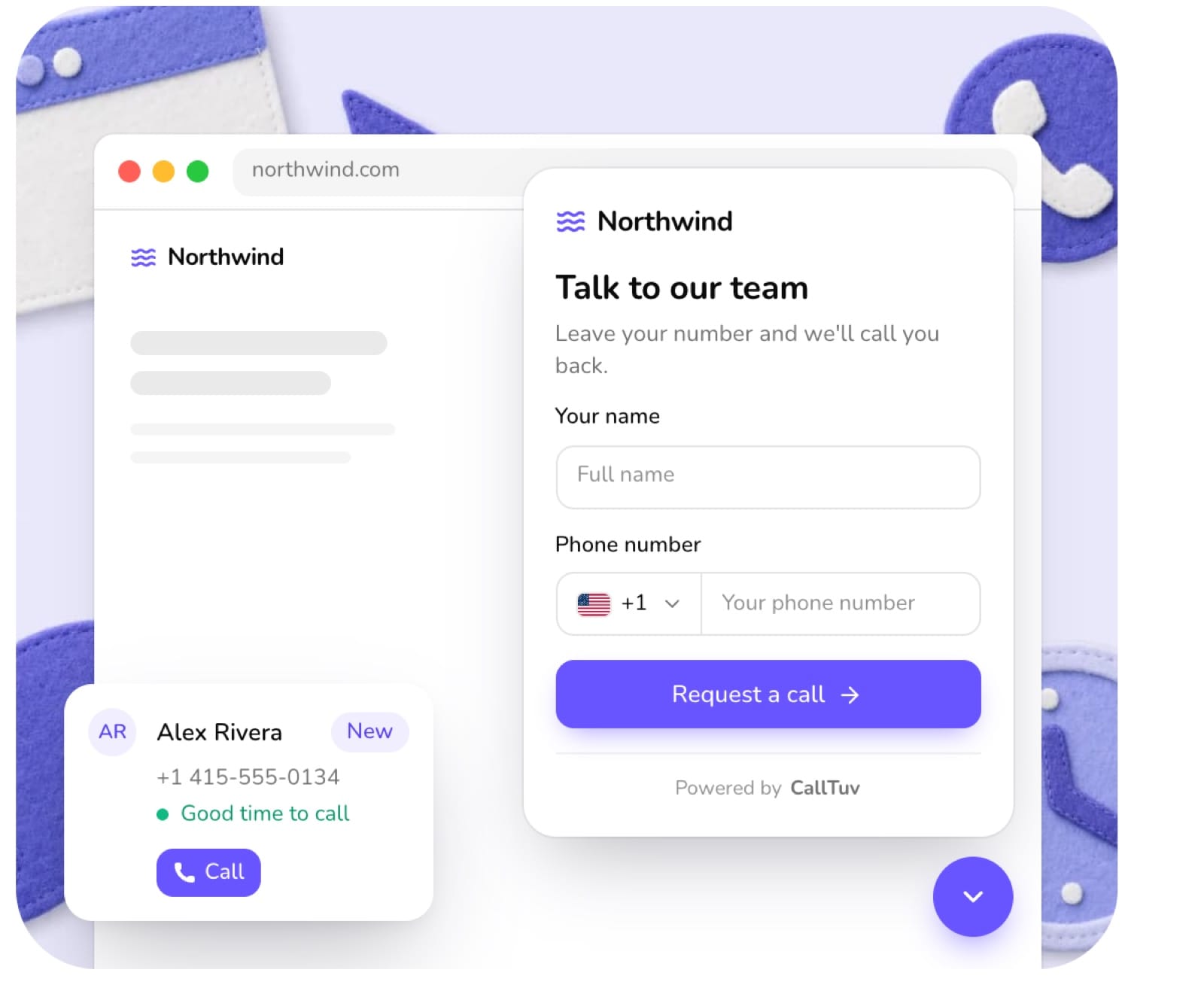
You choose what the form asks for. The phone number is always there; you can add name, email and a message. You also pick the color, your logo, light or dark, a side panel or a centered form, and your own words on the heading and button. There's more on every setting in the step-by-step help guide, and you can see it working on the callback widget page.
Add it to your website in about ten minutes
- Sign up and add credit. Create a free account and add calling credit, from $5. The widget, the Leads list and the lead webhook cost nothing extra; they unlock once your team has credit.
- Design it. Open Business, then Widget. The preview shows exactly what visitors will see, on a computer or a phone. Press Save.
- Paste one piece of code. Open Install, copy the code, and paste it on every page just before the closing body tag. In WordPress, Wix, Squarespace, Webflow, Shopify or Framer, that's the custom code or footer code setting.
- Publish and open your site once. The badge next to Install turns green and says Installed.
You paste the code once. Change the wording or colors later, press Save, and your site shows the new version right away.
Two settings worth turning on before you go live. Opening hours hides the button outside the hours you set, so nobody asks for a call at 3 a.m. and waits all night. Allowed websites makes the widget work only on your own domains, so a copy of your code on someone else's site does nothing.
Leads from your other forms land in the same list
Most businesses already collect leads somewhere: a contact form, a quote form in Typeform or Jotform, a shop checkout, an ad platform. Those leads tend to sit in an inbox that nobody owns.
CallTuv gives each team a private lead webhook, a web address your tools can send leads to. Every lead that arrives there joins the widget's requests in the same Leads list, labeled with where it came from, ready to call.
| Where your leads come from | How to connect it |
|---|---|
| Zapier | Add a Webhooks by Zapier action, choose POST, paste your webhook URL, map the phone field. Webhooks by Zapier needs a paid Zapier plan. |
| Make | Add the HTTP app's Make a request module, POST to your webhook URL, map the fields. |
| A form builder | Find its Webhooks setting, paste the URL, and make sure the form asks for a phone number. |
| Your own code | Send a POST with a phone field. No key or login; the URL itself is the secret. |
Only the phone number is required, with its country code. Name, email, message and a source label are optional. Send the same lead twice by accident and it's added once. The integrations guide has the exact steps for each tool.
Calling international leads back without the guesswork
This is where a callback tool built on an international calling service earns its keep. When a team rings leads in other countries, it's usually one of three things that goes wrong, and it's rarely the sales pitch itself: somebody calls at the wrong hour, the phone bill at the end of the month is a nasty surprise, or the person on the other end sees a strange foreign number and lets it ring out. Each has a fix.
Call at a time that suits them
Requests in your Leads list show the time where that person is right now, with a colored dot. For a widget request it comes from where the visitor is; for a lead from the webhook, it comes from the number's country when that country has a single time zone, so a US or Australian webhook lead shows its country but no time. Green means 9 a.m. to 5 p.m. their time. Amber is early morning or evening. Gray is late night. Open a request and it tells you the best window in their time and in yours, and whether that's now or how long until it starts.
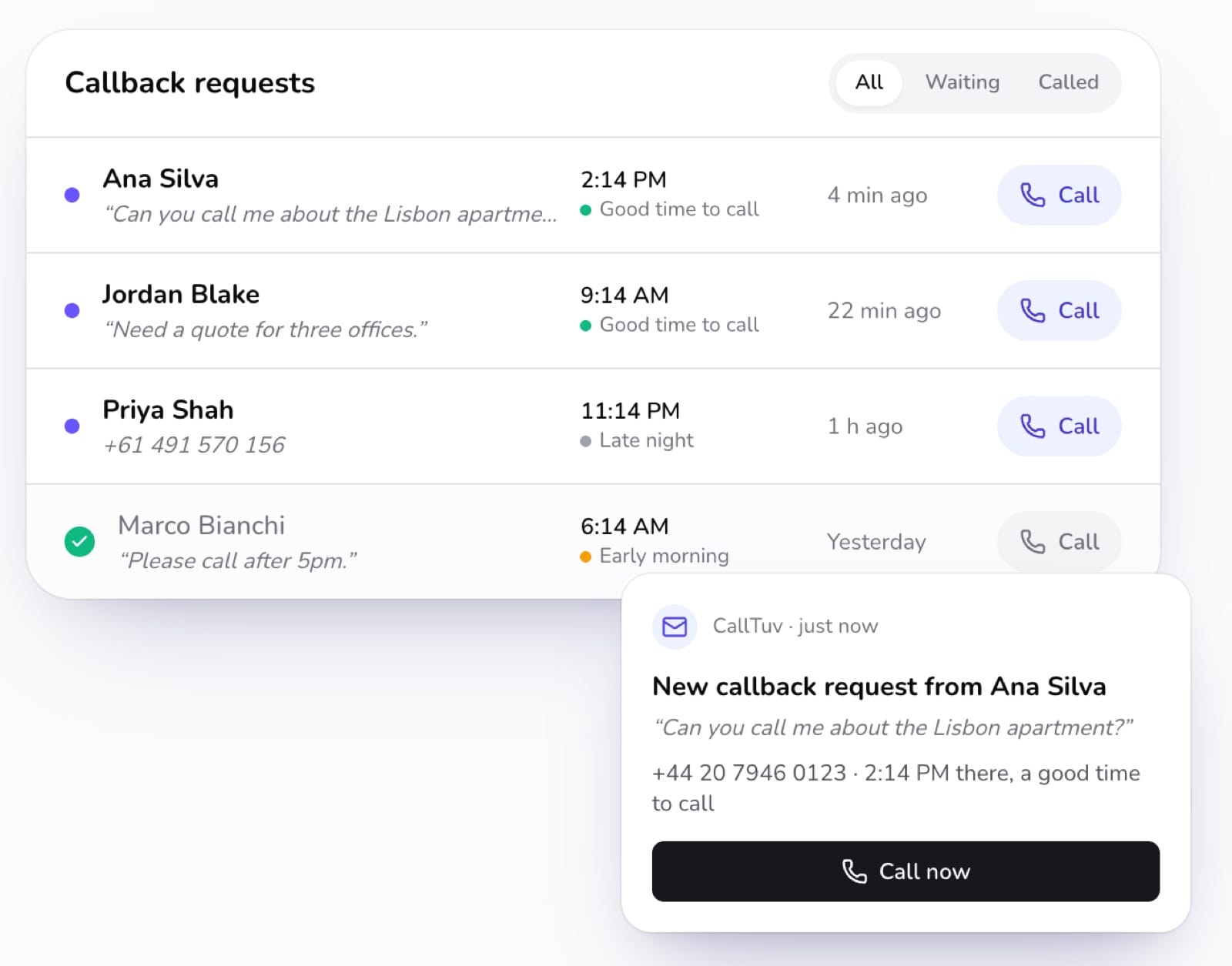
So a request from Sydney that comes in during your afternoon doesn't get a call at 11 p.m. Australian time. You see the gray dot, and you call first thing their morning. For leads in the US, mornings are worth it: our data on the best time to call found that calls at 8 to 10am their time became real conversations about 1.6 times as often as calls from 1 to 4pm.
What a callback costs
Calls are charged per minute at the normal rate for the number you're calling, with no plan or subscription. Here's what a five-minute callback to a mobile costs in some common markets, from CallTuv's live rates, checked 18 November 2026:
| Lead in | Rate to a mobile | 5-minute callback |
|---|---|---|
| United States or Canada | $0.03/min | $0.15 |
| United Kingdom | $0.07/min | $0.35 |
| France | $0.09/min | $0.45 |
| Germany | $0.09/min | $0.45 |
| Spain | $0.10/min | $0.50 |
| Mexico | $0.10/min | $0.50 |
| India | $0.10/min | $0.50 |
| Australia | $0.16/min | $0.80 |
Landlines are often cheaper still: $0.04 a minute to the UK, France or Spain. Calls are rounded up to the whole minute. A $25 top-up covers about 70 five-minute callbacks to UK mobiles, and credit never expires.
Visitors can only enter numbers in countries CallTuv calls, so a lead you can't call never reaches your list. That's 232 destinations, and the same list works for the webhook.
Call from a number they'll recognise
People are wary of unknown numbers, and a lead who asked you to call still has to pick up. You can call from a number you already own after verifying it, or rent a US number to show on every call for $5.95 a month. Our guide to calling from a different number covers both.
It helps to say who's calling in your thank-you message too. Something like "We'll call you within the hour from a US number" sets the expectation, and the phone ringing becomes the thing they were waiting for.
Working the list as a team
Everyone on the team sees the same Leads list and can call anyone on it. Tabs split it into All, Waiting and Called, and a search box finds a lead by name, number, email or message. Because answered calls mark requests as called by themselves, everyone can see who's already been reached.
The team shares one calling balance, with no per-seat fee, so adding a salesperson for the busy season, or a part-timer who only covers European mornings, doesn't add a monthly cost you'll forget to cancel later. Only the team owner can change the widget or see the webhook URL. One pair of hands on the setup.
One thing to know: the Business section, with the widget settings and the Leads list, is on the website dashboard. You can still return calls from the CallTuv app on your phone, and those calls mark requests as called too.
Five habits that get more callbacks answered
- Call fast. The email arrives the moment the request does. Treat it like a ringing phone.
- Respect their clock. Use the colored dot. A call at a good local time gets answered.
- Ask for a message. One line of context, "quote for three offices", turns a cold call into a warm one.
- Set opening hours. If nobody can call on weekends, hide the button on weekends.
- Try again. A call that wasn't answered leaves the request waiting, so it stays on the list until someone gets through.
Frequently asked questions
What is a callback widget?
A button on your website that opens a short form where visitors leave their phone number and ask you to call them. The request goes to your team, and you call them back.
Is the CallTuv callback widget free?
Yes. The widget, the Leads list and the lead webhook cost nothing extra and unlock once your team has added calling credit, from $5. Calls back are charged per minute at the normal rate for each number, from $0.03 a minute.
Do visitors need an app or an account?
No. They type their number into the form on your site and press send. Your callback is an ordinary phone call to their mobile or landline.
Can I call back leads in other countries?
Yes. CallTuv calls landlines and mobiles in 232 destinations, and widget requests show the time where they are, so you can call at a sensible hour for them.
Which websites does it work on?
Any site where you can add a piece of code, including WordPress, Wix, Squarespace, Webflow, Shopify and Framer. You paste it once, before the closing body tag.
Can I send leads from Zapier, Make or my own forms?
Yes. Each team gets a private lead webhook. Send a POST with the phone number and the lead appears in the same list as the widget's requests.
Can my whole team call the leads?
Yes. Everyone on the team sees the same list and can call, open and mark requests. Only the team owner can change the widget and gets the email for each new request.
Can I stop people asking for calls when we're closed?
Yes. Turn on opening hours and set them for each day. Outside those hours the button hides from your site.
Ready to try it? Add the free callback widget to your site, and the next person who wants to talk to you won't have to wait for an email.

Make the call from your browser
Reach landlines and mobiles in 200+ countries. Pay as you go and see the rate before you dial.
Open the web dialerOr call from your phone